Practice owners ask this all the time. A second question usually follows. Do I have to change my software for this to work? The short answer is no. In most cases, a medical billing virtual assistant works inside the system your staff already uses, with permissions you control. The details differ by platform. Epic handles access one way. Athenahealth handles it another. Tebra, which grew out of Kareo, splits billing work across two screens. Knowing how each one works before you hire saves weeks of trouble.
Three Ways Billing Support Can Connect
Remote billing support does not fit one mold. Three access models cover most setups. Many practices use a mix.
A named user seat. Your EMR admin creates a login for the biller inside your system. That person works as a normal user, with permissions limited to billing tasks. Every action shows up in your audit log.
Delegate or remote access. Some platforms let an outsider reach your account through a delegated setup the vendor runs. Epic supports remote access structures that health systems manage for their billing partners.
Portal and clearinghouse workflow. The biller works through payer portals and a clearinghouse, then syncs results back into your system. This model fits when your software has no detailed user roles.
| Access Model | How It Works | Best Fit |
| Named user seat | Login inside your EMR, permissions limited to billing | Most practices with standard billing work |
| Delegate access | Outside party reaches the account through a vendor setup | Groups already running Epic or similar systems |
| Portal and clearinghouse | Claims worked in payer portals, results synced back into your system | Software without detailed user roles |
[Infographic: Three Ways Billing Support Connects — Named User Seat → Scoped Permissions → Audit Log → Access Removed on Request]
Whichever model you choose, the rule stays the same. Access should be specific, reviewable, and easy to remove. A biller who can do the job without seeing the whole chart is one you can bring on quickly.
What Access Inside Epic Looks Like
Epic is the platform most practice owners worry about. It runs at large systems, and the access rules feel strict. In practice, that helps you. Billing partners usually work under a named user account your Epic admin creates. That account carries a role limited to the billing and follow-up work assigned to it. Everything runs through your current security setup. Your password rules, session timeouts, and audit trail all apply. Many practices pair the billing seat with their own single sign-on. The biller signs in the way your employees do, and the session is logged like any other. The benefit is simple. You never hand over credentials. Nobody shares a password, and the account lives inside your system until you turn it off. Groups that already have a third-party access rule move fast here, so ask for that document first.
Working Inside Athenahealth
Athenahealth works differently, and the difference tends to favor smaller practices. athenaOne runs in the cloud, and permissions are set per user by role. Your admin can create a billing seat limited to claims, worklists, payment posting, and reporting. Clinical access stays closed unless you open it. Because the platform runs in a browser, nothing needs installing. Your billing partner signs in from their own office and works inside your account.
A remote biller Athenahealth integration usually follows a staged path. Practices start with a narrow permission set. They watch the worklist clear for a month, then widen access once the output looks right. That order gives you proof before you hand it more.
Tebra and Kareo: One Platform, Two Names
If you have heard both names for the same system, here is why. Tebra formed when Kareo combined with PatientPop. Kareo’s billing tools moved into the Tebra platform, and the older name still shows up in docs and daily talk. For billing support, one detail matters most. A Tebra billing virtual assistant often works across two screens. Clinical notes live in the EHR, while claims, eligibility, and denial work run on the billing side. Depending on the setup, the biller may also need to read encounter data. Ask your partner which screens they need on day one. Setting up billing access first, and adding clinical view only if needed, keeps the start clean and the access tight.
Other Practice Management Systems
Beyond those three, billing support commonly runs in eClinicalWorks, NextGen, Allscripts, AdvancedMD, DrChrono, and Practice Fusion. The pattern repeats almost everywhere. A named user, limited permissions, and an audit trail you can review.
Some smaller platforms offer limited user roles. Where that happens, the portal and clearinghouse model fills the gap. The biller works claims through payer portals and syncs results back into your system. Your reporting stays complete either way, and EHR and EMR billing support fits whichever route your software allows. When comparing practice management software VAs, ask one question above all others. Not which systems a partner knows, but how they get access and how you take it away. Anyone who answers that clearly has done this work before.
The Security Framework Behind All of This
Remote billing support falls under HIPAA, and the rules are well established. A billing partner acts as a business associate, because it handles protected health information for you. That calls for a signed Business Associate Agreement before anyone touches your data. The agreement spells out what the partner may do with the data, how they protect it, and what happens if something goes wrong.
Beyond the agreement, expect minimum necessary access. The biller gets the permissions the job needs and nothing more. Multi-factor authentication should be on, and sessions should time out. You should be able to pull the audit log any time. None of this is unusual. It is the same standard you would apply to a new hire in your office, stretched across a network connection.
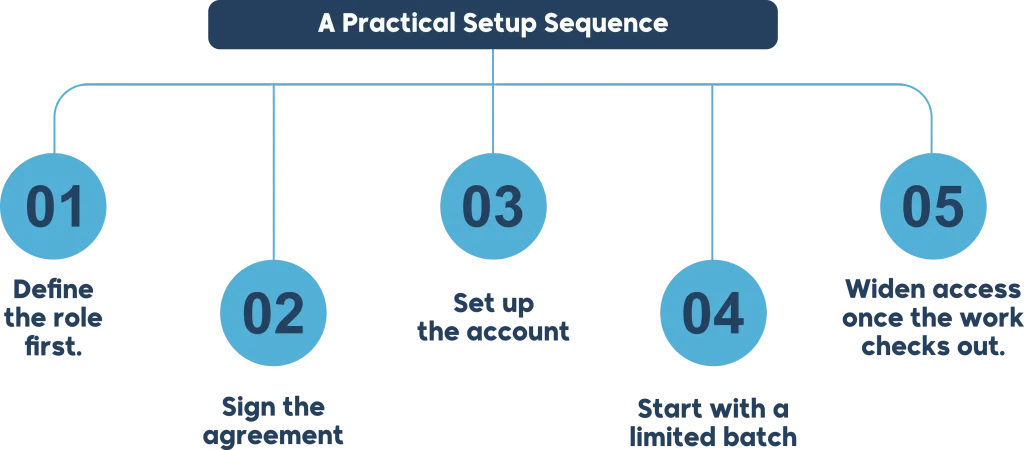
A Practical Setup Sequence
Onboarding follows a set order. Rushing the first two steps causes most of the problems.
Define the role first. Write down what the biller will handle. Claim submission, follow-up, payment posting, denial work, reporting. That list becomes your permission set.
Sign the agreement. Business Associate Agreement before access, with no exceptions.
Set up the account. Your admin creates the login, assigns the role, and turns on multi-factor authentication.
Start with a limited batch. Pick one piece of work, such as claims older than 60 days, and review the output closely. Working alongside EHR and EMR billing support lets you test one function before opening the full cycle.
Widen access once the work checks out. Add functions only after you have seen the first results.
| Stage | Typical Timing | What Happens |
| Role definition and agreement | Week 1 | Scope documented, Business Associate Agreement signed |
| Account provisioning | Weeks 1 to 2 | Login created, permissions assigned, MFA enabled |
| Supervised start | Weeks 2 to 3 | Limited batch of claims worked, output reviewed |
| Full access and reporting | Week 4 onward | Permissions widened, regular reporting begins |
Most practices reach full operation in three to five weeks. How fast depends on the agreement and the account setup.
Choosing Support That Fits Your Stack
Platform familiarity matters more than most buyers expect. The administrative simplification rules set the standards for documenting that access. A biller who knows your system spends the first day working. A biller who does not spend the first week learning menus. Whichever you choose, confirm the compliance framework in writing before work begins.
Ask for specific experience, not a general claim. A useful question is whether your partner has worked in your exact platform, and which version. Someone with virtual biller Epic EHR experience will know the workqueue layout right away. A biller who has only used another enterprise system needs time to adjust.
The same logic applies at the smaller end of the market. A partner who has run Tebra billing virtual assistant workflows already knows which screen handles eligibility and which handles claims. That knowledge beats a slightly lower hourly rate.
Conclusion
A medical billing virtual assistant can work inside your EMR or EHR, and most do. The setup runs on limited permissions, a signed agreement, and an audit log you control. You never hand over passwords, and you can pull access the moment you need to. Start with your platform’s access model. Grant the minimum, watch the first batch of work, then widen. An experienced medical billing company shortens that ramp a lot, because they have done it in your system before. The real question is not whether remote billing support fits your software. It is whether you picked support that knows it.
FAQs
Can a virtual biller access my EHR without me sharing my password?
Yes. A named user account is created inside your system, and the biller signs in with their own credentials. You never share yours, and you can disable the account at any time. That kind of controlled data exchange is what interoperability standards were built for.
Is it HIPAA compliant to let a remote biller into my system?
Yes, provided the partner signs a Business Associate Agreement and works within minimum necessary access. That is the standard framework for third-party billing support in the United States. The HIPAA rules on business associates cover this arrangement directly.
Does Epic allow outside billing companies to access its system?
Organizations running Epic provision access through their own administrator, using a scoped role and their existing security policies. Epic supports remote and delegated arrangements that the health system administers.
What permissions should a billing virtual assistant have in athenahealth?
Typically claims, worklists, payment posting, and reporting. Clinical documentation access is set up separately and is often unnecessary for billing-only work. Federal interoperability guidance covers how systems are expected to share that data safely.
Is Tebra the same as Kareo?
Tebra is the company that formed when Kareo combined with PatientPop. Kareo’s billing tools are now part of the Tebra platform, and the older name still appears in documentation.
How long does it take to get a virtual biller working in my system?
Most practices reach full operation in three to five weeks, with account provisioning usually complete within the first two.
What if my practice management software does not support user roles?
Then the portal and clearinghouse model applies. A medical billing virtual assistant works claims through payer portals and reconciles the results back into your system, so your reporting stays whole.
Do I need to change my EHR to outsource billing?
No. Remote billing support is built to work inside the system you already use. Changing platforms is a separate decision with its own costs and timeline.